SEO Version



18
PRINT.IT
0870 903 9500
Managed Print Services
...continued – What SMEs really need
Alan McLeish, senior product
marketing manager, OKI
volumes that they are not
always achieving is when
customer dissatisfaction
comes in.”
Brother is currently in the
process of launching an MPS
through its resellers that
doesn’t commit customers to
monthly volumes. Customers
get two bills: one for the
monthly rental of the products
and then a quarterly, variable
bill for usage.
Jones said that Brother
was working very hard to make
sure that its channel only sold
MPS to those that really needed
it, as there were still a huge
number of businesses for
which a Pay As You Go model
was the most benefcial option
– even in cases where other
devices might be managed
under an MPS.
“Industry page data
suggests that 40% of all pages
are now on MPS. But if you dig
below that and ask what that
really means, it means a lot
of departmental, centralised
MFPs are put onto an MPS,
but decentralised printers
on the desktop are not on an
MPS. Putting everything on a
centralised MPS does not make
sense for everyone,” he said.
Basic service
Oki, too, has an MPS for small
and medium-sized businesses.
In fact it has two: a very basic
service bought separately from
the hardware, Oki Flat Rate,
and a more comprehensive
MPS offering called Print
Optimiser.
The former is designed to fx
costs for on-site maintenance
and delivery of consumables,
with billing via a click rather
than the ad hoc purchase
of printer consumables.
Customers commit to a certain
number of prints and are
charged a fxed monthly cost
(plus surcharges if they go over
the contracted page volume).
Benefts to the customer
include predictable costs that
are claimed to be 25% cheaper
than pay-as-you-go procurement
of consumables.
Alan McLeish, OKI senior
product marketing manager,
points out that Oki Flat Rate
was designed for people with
a handful of machines (though
one customer has 30), and that
it has gone down particularly
well in the education sector.
“The largest uptake has
been in schools where they
have been cautious of signing
up to MPS because people had
their fngers burnt on traditional
copier contracts and signed
up for volumes of pages they
would never use; and we have a
special offer that gives schools
two payment-free months in
July and August,” he said.
Print Optimiser
SMEs with more devices are
better served by Oki’s Print
Optimiser, which has the
potential to deliver the usual
elements of an MPS – audit/
propose/build/review/manage
– and savings though feet
consolidation and improved
device management.
McLeish says that despite
these capabilities, the real
needs of SMEs mean that Print
Optimiser is primarily used as a
print service.
“You can look at more
advanced reviews, document
management software, Follow
Me printing, individual charge
back etc., but these kinds
of requests are few and far
between. There are not as many
of these implementations as
the more basic print service.
Customers may already have a
document management system;
or they may not be concerned
with anything so complex
because the size of the business
doesn’t warrant it,” he said.
“These guys are seeking
to control and limit their
costs. Follow Me/pull printing
might appear attractive, but
if you have 50 people and 15
machines, there’s no need for
it. Some people want a PIN
release for security of print;
other people want it for pull
print to have the fexibility to go
to any device, but if you look at
users’ habits, nine times out of
10 they go to the same device.”
He adds that workers in
small and medium-sized
businesses want simple,
familiar printers near their
desks, which is what Oki is
ideally placed to deliver.
“Traditionally a copier vendor
would replace all printers
and put in a large MFP, which
people didn’t like because they
were way too complicated and
they had to walk too far. There
is now a growing realisation that
people want to have printing
devices that are close to them
and simple to use. They want to
use the machine they know.”
McLeish added: “There
is a myth that copiers are
responsible for the majority
of pages, but our audits show
that most come from desktop
or workgroup print devices.
In the past someone would
focus on copiers and seek to
remove desktop print devices
but you end up with bottlenecks
because a single MFP can’t
cope with the volume of work
being put through it.”
That said, there are clear
benefts in improving the
management of desktop
devices through a service like
Print Optimiser.
“There are a number of
hidden costs associated with
printing. Because they are low
cost people tend to go out and
buy them: one department has
one type of printer and another
has another, so you have
different devices with different
consumables. Our appeal is
to consolidate the number of
devices, make sure they are
the right devices, but limit them
to as few models as possible
so everyone knows how to use
them.”
The message for small
businesses is clear. Address
print costs and print
management, but don’t assume
that an MPS is necessarily the
best or the most cost-effective
option. In some cases it will be,
but in many others a Pay As You
Go model might give greater
fexibility and freedom of choice.
“The largest uptake
has been in schools
where they have been
cautious of signing up
to MPS because people
had their fngers burnt
on traditional copier
contracts...”
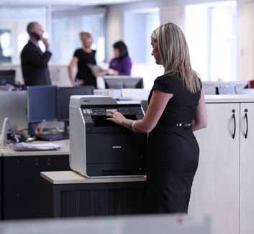
Often, only departmental, centralised MFPs are put onto an
MPS, with desktop devices remaining outside its scope
Powered by FlippingBook Publisher